
auto-config-banner
•
MACOS AUTOMATION
AUTOMATOR
IWORK AUTOMATION
•

The “Restore Devices from Specified Backup” action

The Restore Devices from Specified Backup action will restore each of the connected devices whose ECID is passed as input to this action from a specified device backup archive.

Input:ECID Identifiers for the connected devices to restore
Output:ECID Identifiers for the connected devices that were restored
Parameters:

If the selected backup archive is password-protected, enter the password for the archive in the text entry field.

Follows:

Erase Devices, Restore Devices

NOTE: the specified devices must be newly erased or updated before restoring from backup.

The Action View
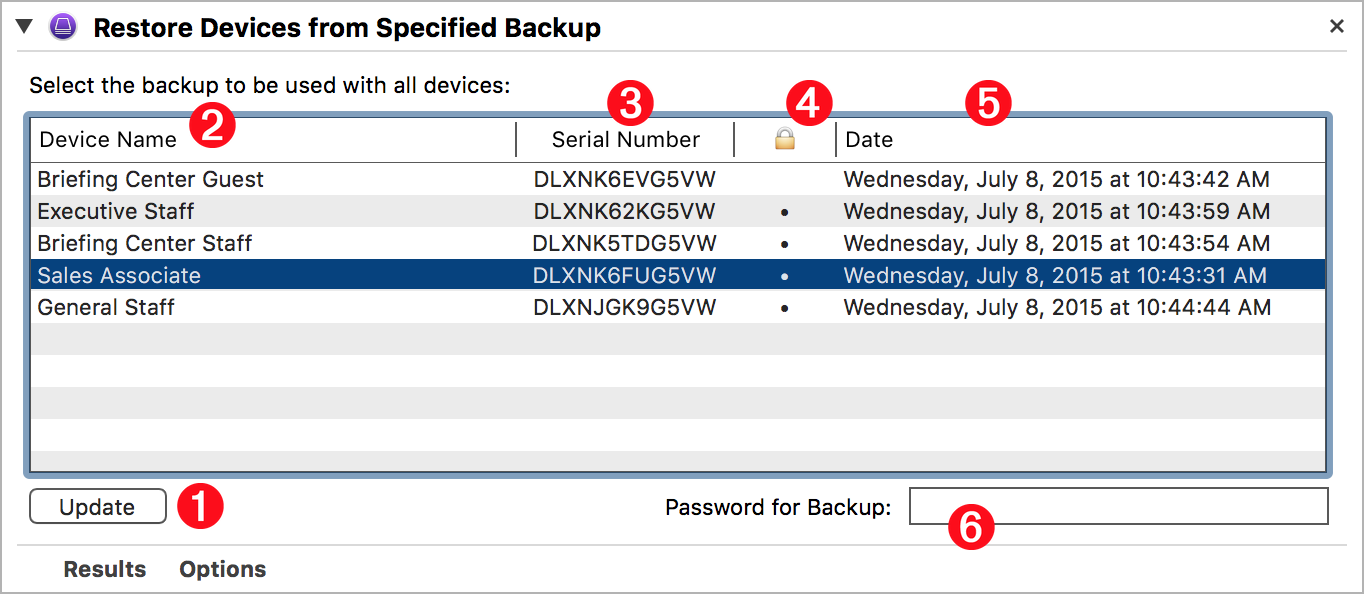
restore-devices-from-specified-backup

To view information about the device backups currently stored on the host computer, click the “Update” button  1  and the view above the button will be populated with a list of backups identified by device name  2  serial number  3  the backup archive’s encryption status  4  and the creation date  5  of each device backup. If the selected device backup is encrypted, an password entry field  6  will appear, in which you enter the related password.

NEXT TOPIC: Installation Actions

TOPICS

  • Overview
  • Automator Quick-Start

  • Supervision Identity
  • Selection Actions
  • DEP Actions
  • Formatting Actions
  • Backup Actions
  • Backup Specified Devices
  • Restore Devices from Backups
  • Restore Devices from Specified Backup
  • Installation Actions
  • Information Actions
  • Configuration Utility Script Library
  • “Attached” Workflows

  • Workflow Recipes
  • iOS Classroom

DISCLAIMER

THIS WEBSITE IS NOT HOSTED BY APPLE INC.

Mention of third-party websites and products is for informational purposes only and constitutes neither an endorsement nor a recommendation. MACOSXAUTOMATION.COM assumes no responsibility with regard to the selection, performance or use of information or products found at third-party websites. MACOSXAUTOMATION.COM provides this only as a convenience to our users. MACOSXAUTOMATION.COM has not tested the information found on these sites and makes no representations regarding its accuracy or reliability. There are risks inherent in the use of any information or products found on the Internet, and MACOSXAUTOMATION.COM assumes no responsibility in this regard. Please understand that a third-party site is independent from MACOSXAUTOMATION.COM and that MACOSXAUTOMATION.COM has no control over the content on that website. Please contact the vendor for additional information.