auto-config-banner
•
MACOS AUTOMATION
AUTOMATOR
IWORK AUTOMATION
•

The “Install Wallpaper on Devices” action

The Install Wallpaper on Devices action is used to change the default wallpaper of connected devices. You can optionally add a text overlay.

Input:ECID Identifiers for the connected devices to receive the indicated wallpaper image file
Output:ECID Identifiers for the connected devices that received the indicated wallpaper image file
Parameters:

There are parameters for:

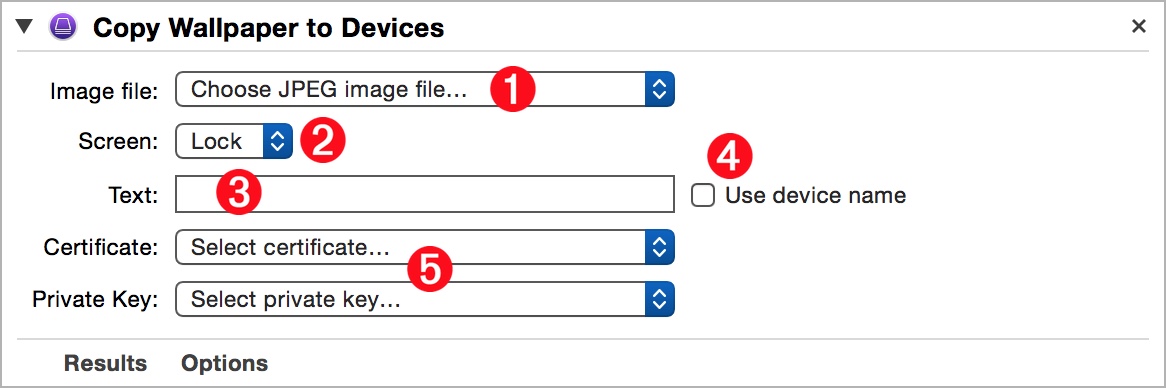
  •  1  Choosing the JPEG image to use as the device wallpaper

  •  2  Whether to have the transfer image appear on the lock screen, the home screen, or both screens.

  •  3  Any custom text to overlay on the screen

  •  4  Use the device name instead of the custom text

  •  5  Identifying the supervision certificate and private key files

The Action View

(⬆ see above ) The action view provides access to the following user-settable parameters:

 1  Choosing the JPEG image to use as the device wallpaper.

 2  Whether to have the transfer image appear on the lock screen, the home screen, or both screens.

 3  Any custom text to overlay on the screen

 4  Select this checkbox to use the device name instead of the custom text

 5  Identifying the supervision certificate and private key files using the popup menus.

NEXT TOPIC: Information Actions

TOPICS

  • Overview
  • Automator Quick-Start

  • Supervision Identity
  • Selection Actions
  • DEP Actions
  • Formatting Actions
  • Backup Actions
  • Installation Actions
  • Install Apps
  • Install Profiles
  • Copy Documents
  • Install Wallpaper
  • Information Actions
  • Configuration Utility Script Library
  • “Attached” Workflows

  • Workflow Recipes
  • iOS Classroom

DISCLAIMER

THIS WEBSITE IS NOT HOSTED BY APPLE INC.

Mention of third-party websites and products is for informational purposes only and constitutes neither an endorsement nor a recommendation. MACOSXAUTOMATION.COM assumes no responsibility with regard to the selection, performance or use of information or products found at third-party websites. MACOSXAUTOMATION.COM provides this only as a convenience to our users. MACOSXAUTOMATION.COM has not tested the information found on these sites and makes no representations regarding its accuracy or reliability. There are risks inherent in the use of any information or products found on the Internet, and MACOSXAUTOMATION.COM assumes no responsibility in this regard. Please understand that a third-party site is independent from MACOSXAUTOMATION.COM and that MACOSXAUTOMATION.COM has no control over the content on that website. Please contact the vendor for additional information.